
"Welcome to CA Office Automation's new WhatsApp Integration feature.
With this enhancement, you can now communicate with your clients directly through WhatsApp from within the software.
The WhatsApp Integration is available across multiple modules including:
• WhatsApp API Settings
• Email/SMS Configuration
• Outward Communication
• Multiple Outward Communication
• Email SMS Scheduler
Let's explore each feature step-by-step."
1. WhatsApp API Settings
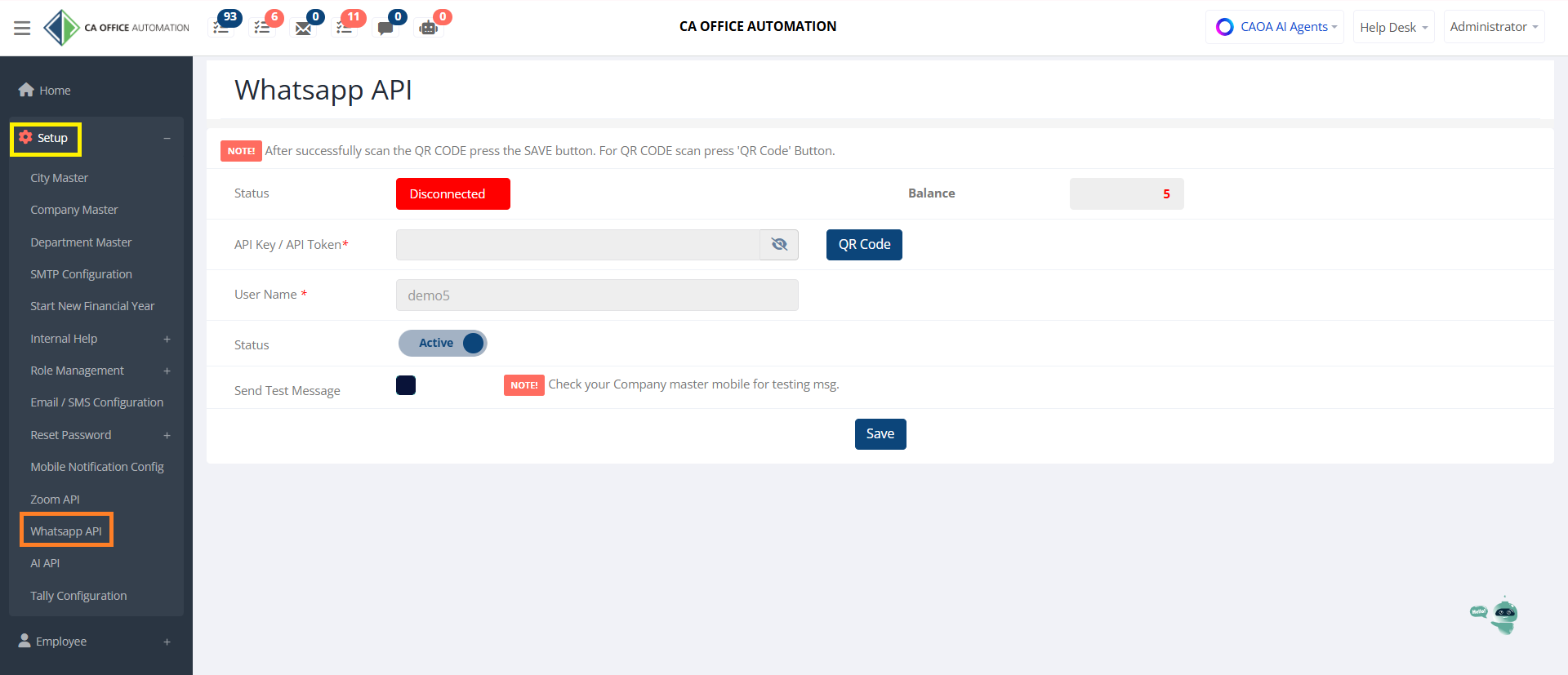
"Before using WhatsApp messaging, you need to configure your WhatsApp API account.
Navigate to:
Setup → WhatsApp API Settings
Here you can connect your WhatsApp number with CA Office Automation."
"Click the QR Code button and scan the displayed QR code using your WhatsApp mobile application."
"Enable the Active option to activate WhatsApp services."
"You can send a test message to verify the configuration before using WhatsApp for client communication."
"The available messaging balance is displayed here."
"After successful configuration, click Save."
"Once connected, WhatsApp messaging becomes available throughout the software."
2. Email / SMS Configuration
"Next, let's configure WhatsApp templates and notifications."
Navigate to:
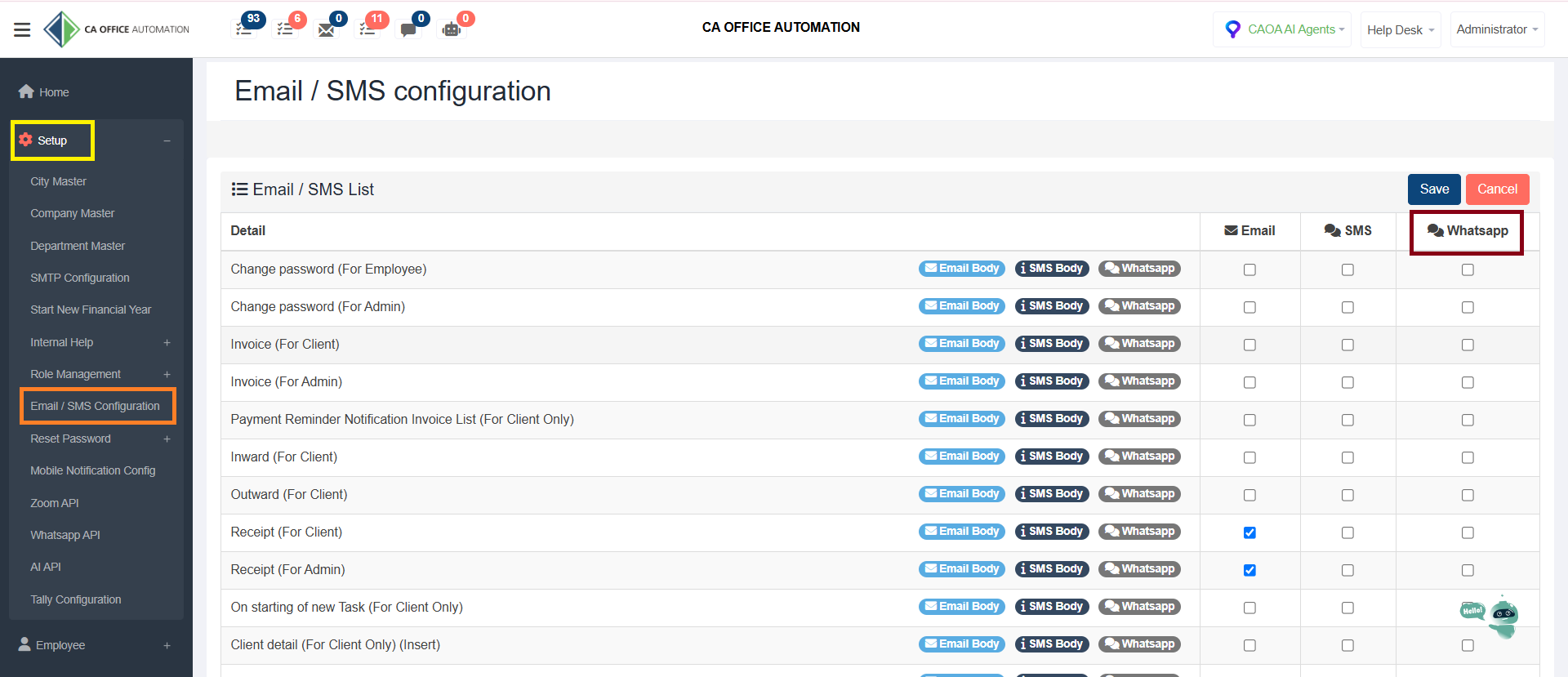
Setup → Email / SMS Configuration
Previously, this page supported Email and SMS communication only.
Now, WhatsApp support has also been added."
For each notification type, you can independently choose whether communication should be sent through:
• Email
• SMS
• WhatsApp
Examples include:
• Invoice Notifications
• Payment Reminders
• Inward Communications
• Outward Communications
• Receipts
• Client Notifications
• Employee Notifications"
" you can make WhatsApp message on & off from here by clicking this tab."
Benefits
"This allows firms to maintain consistent and professional communication with clients."
3. Outward Module
"Now let's see how WhatsApp can be used in the Outward module."
Navigate to:
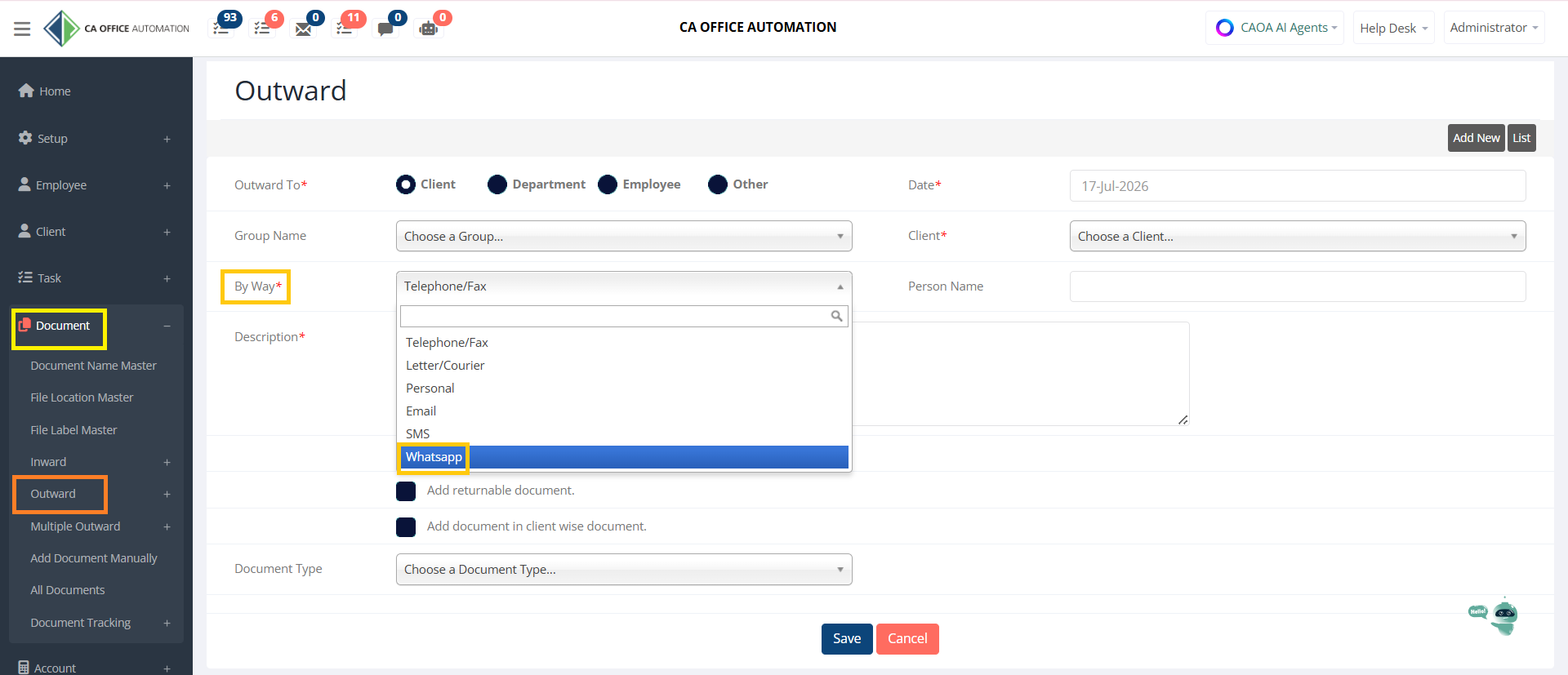
Document → Outward
Previously, users could record communications through:
• Telephone
• Courier
• Email
• SMS
Now WhatsApp has been added as an additional communication channel."
Process
"While creating an Outward entry:
Select:
• Client
• Communication Type
• Description
Then choose WhatsApp as the communication method."
Benefits
"This helps maintain a complete communication history while instantly sending WhatsApp messages to clients."
4. Multiple Outward
"The Multiple Outward module allows bulk communication with multiple clients simultaneously."
Navigate to:
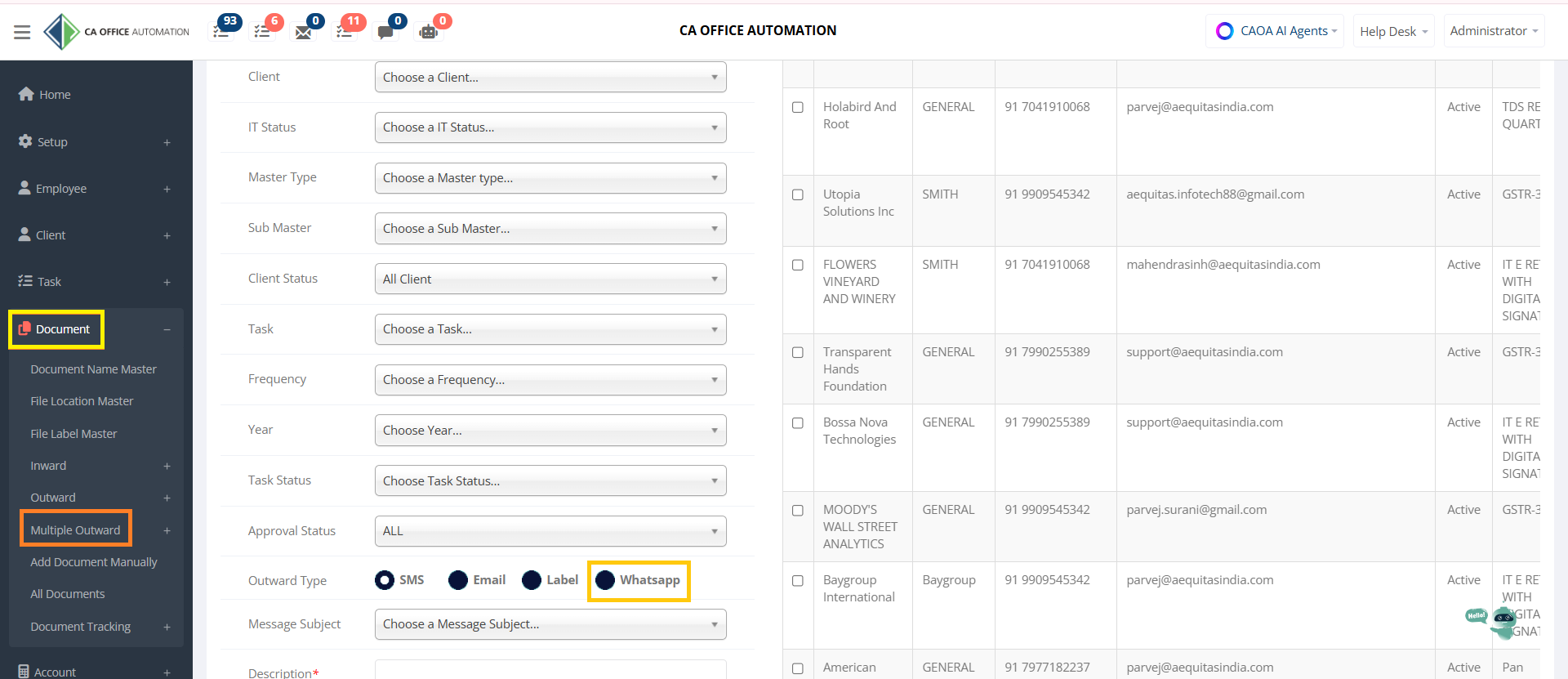
Document → Multiple Outward
"Filter clients using various criteria such as:
• Group Name
• Client Name
• Task Status
• Task
• Frequency
• Financial Year
• Client Status
After selecting recipients, choose the communication type."
New WhatsApp Option
"You can now select:
• SMS
• Email
• Label
• WhatsApp"
Choose the desired message template or subject."
"Send WhatsApp messages to multiple selected clients in a single action."
"This significantly reduces manual effort and improves communication efficiency."
5. Email SMS Scheduler
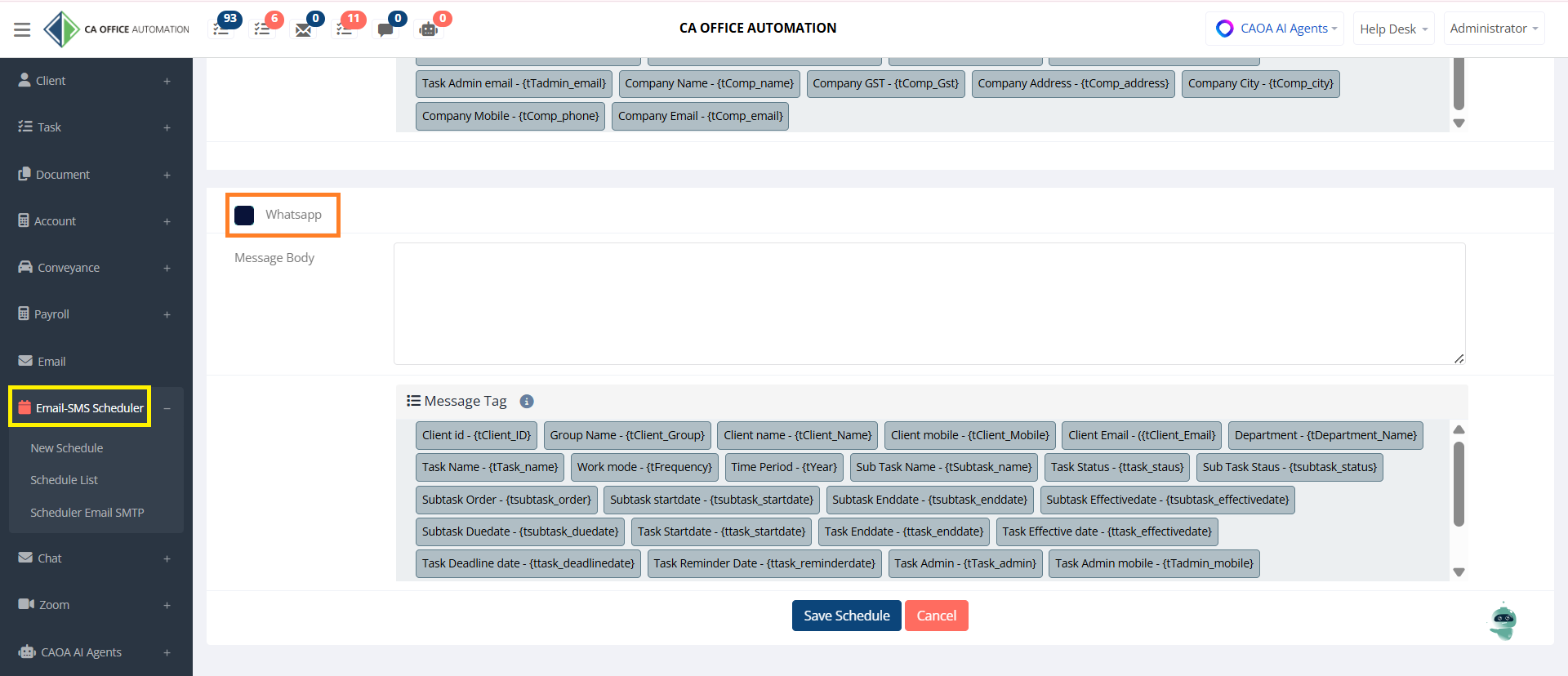
"One of the most powerful enhancements is WhatsApp scheduling."
Navigate to:
Email SMS Scheduler → New Schedule
Previously, this module supported scheduled emails only.
Now WhatsApp scheduling has also been added."
You can schedule Email and WhatsApp on a particular event related to Task, Client, Employee, Invoice, and from the import Excel option.
"In the WhatsApp section, enter the WhatsApp message body."
"You can use dynamic tags such as:
• Client Name
• Mobile Number
• Task Name
• Due Date
• Task Status
• Company Name
and many more."
Example
"Dear {Client Name},
This is a reminder that your {Task Name} is due on {Task Due Date}.
Please contact us if you require any assistance.
Thank you."
Save Schedule
"Click Save Schedule.
The system will automatically send WhatsApp reminders based on the defined schedule."
Benefits
"This helps automate follow-ups, reduce manual work, and ensure timely communication."
"With WhatsApp Integration in CA Office Automation, firms can now manage client communication more effectively through a single platform.
Thank you for using CA Office Automation."